Made by a teacher

The classroom
sign-out kiosk.

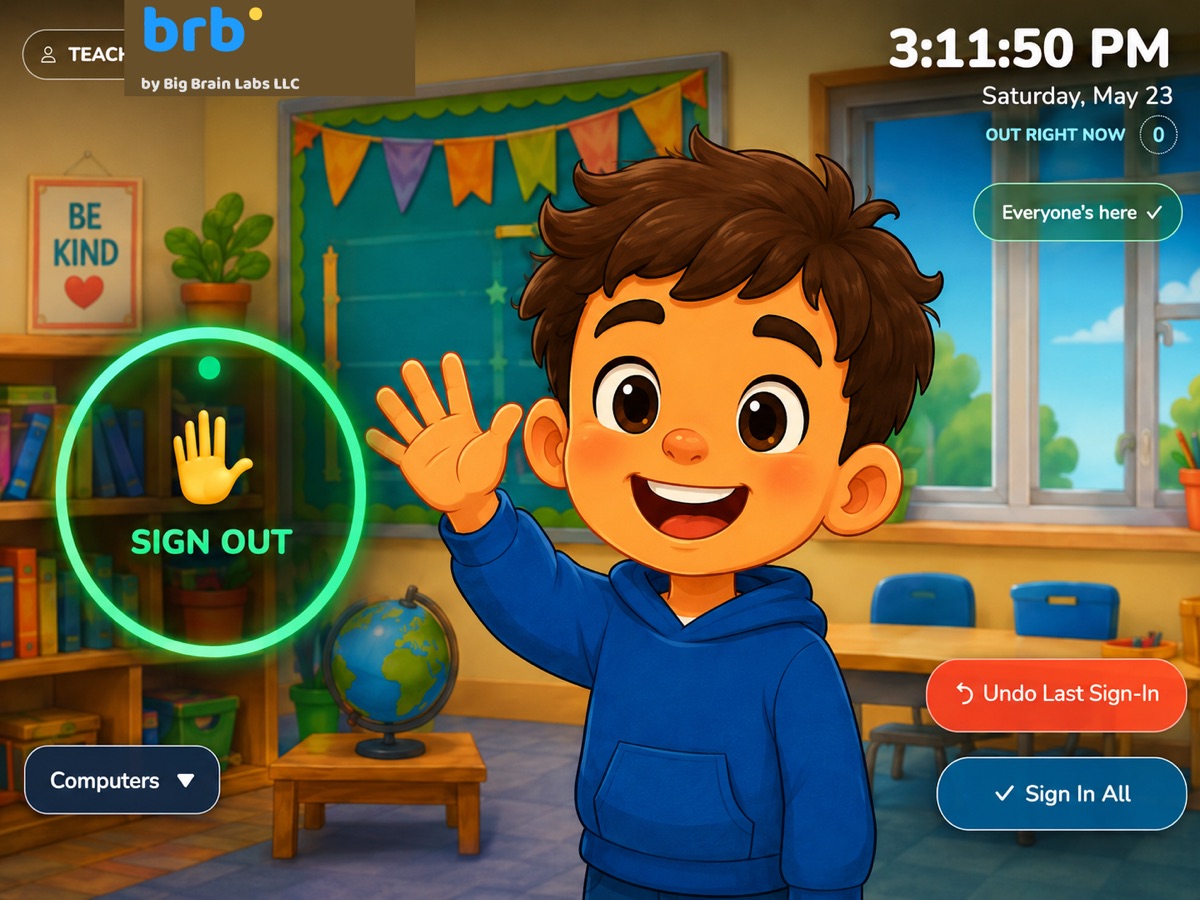
brb. is the touchless way for students to sign in and out of your room. They wave at the kiosk, scan a QR card, or tap — pick a reason, and you get a tidy log of who left, when, and why. No shared pens, no lost paper, no clipboard chaos.

14-day free trial No credit card to start Works on any iPad or laptop
10:23:47
Sign Out
Maya · 10:18
Jordan · 10:21
🚻
💧
🩹
🍎
The old way

Sign-out books are
stuck in the past.

Wooden passes. Lanyards. Sign-out sheets passed around the room. The same pen and clipboard touched by every kid, every period, every day. You know exactly which clipboard we mean.

🦠

Unsanitary

One shared pen, one clipboard, one wooden pass — touched by every student, every period, every day. Cold and flu season makes that math worse. Most teachers stopped thinking about it years ago.

⏱️

Unreliable

Sign-out sheets get scribbled on, ripped, lost. Students forget to come back. The clipboard becomes illegible by Wednesday. There's no real record of who's where, when — just a vague memory at the end of the day.

⚠️

Irresponsible

Students leave the room and you have nothing to show for it. If something happens in the hallway, "I think Maya left around 10:15" isn't an answer. You deserve a record. So do they.

brb. is cleaner, faster, and accountable — without making a single thing harder for you.

How it works

Three steps.
Zero hassle.

Set brb. up on an iPad or laptop near the door. Open the page in any browser. That's the whole installation.

01

Wave at the kiosk — or scan a card

The student walks up and waves over the green Sign Out circle, taps it, or holds a printed QR card to the camera. brb.'s camera handles all three. No shared touchscreen required.

02

Pick a reason, snap a photo

Student picks bathroom, water, nurse, or another reason. brb. counts down 3, 2, 1 and takes a photo with the time stamped on it. The whole thing takes 6 seconds.

03

Sign back in to clear the pass

Their face appears in your kiosk's queue. When they return, they tap their face pin and sign back in. You get a complete pass record — out time, in time, reason, photo.

Works on what you have

Designed for every
classroom device.

brb. runs in any modern web browser — no app store, no installation. Set it up on whatever you already have at the door.

iPad

The most popular setup. Mount one near the door and you're done. Safari works perfectly.

iOS 14+

Chromebook

Works great on the school-issued Chromebooks you probably already have. Chrome browser, no extra steps.

Chrome OS

Laptop

Mac, Windows, anything with a webcam. Open the browser, sign in, you're running.

macOS / Windows

Desktop

Got a teacher computer with a webcam? brb. runs there too. Plug-in webcams work fine.

Any modern browser
Chrome runs best. Safari, Firefox, and Edge all work too — but if you have a choice, Chrome gives you the smoothest hand-tracking experience.
What's inside

Everything a classroom needs.
Nothing extra.

Built for the way teachers actually need to track who's out — quick, glanceable, hands-free.

👋

Touchless control

MediaPipe hand tracking lets students sign out without touching the device. Tap or click works too — it's just options, not requirements. No shared touchscreen to clean, no lost styluses, nothing to pass between 30 kids.

🔳

QR sign-out cards

Print a numbered set of laminated QR cards. Students hold their card to the camera, pick a reason, and they're out.

📸

Photo log

Every sign-out captures a time-stamped photo. Searchable gallery. 30-day auto-deletion built in.

🔒

Auto-lock screen

Kiosk locks after your chosen idle time, when you switch tabs, or at the end of the school day. Student photos stay behind a password.

📚

Multiple classes

Switch periods with a tap, or set a schedule and let brb. switch automatically. Separate rosters, galleries, and pass logs per class.

🤝

Partner mode

Sign two students out as a pair — both faces appear in the queue, signed in together.

👩‍🏫

Sub-teacher mode

A separate substitute password gives subs the action buttons without exposing your settings or gallery.

🏥

Medical exemptions

Mark students whose frequent trips shouldn't flag — invisible to other students. Discreet by design.

📊

Stats & export

See who's leaving the most. Export pass records as CSV for admin reports, parent conferences, or your own peace of mind.

🔒

Student data never
leaves the classroom.

Most ed-tech tools talk about privacy. brb. is built around it. Student names, photos, and pass records live entirely in your browser's local storage — on the device running brb. They never reach our servers, never sync to the cloud, never become a dataset somewhere.

  • Photos stay localEvery sign-out photo lives on your iPad. We have no copy.
  • Names stay localYour roster lives on your device. Switch devices, you start fresh.
  • FERPA-alignedNo student records transmitted to brb. — district-friendly by design.
  • NY Ed Law 2-d readyLocal-first architecture supports the strictest student privacy laws.
Pricing

Pick what works for you.

Try monthly if you're not sure. Save with annual if you are. Lock in lifetime access if you want to support brb. as a founding teacher. Either way: 14-day free trial, cancel anytime, full refund within 14 days.

Monthly
Try it without commitment
14-day free trial
$4.99 per teacher / month
  • Full access to all features
  • Unlimited students & classes
  • Touchless & touch sign-out
  • Photo log & 30-day gallery
  • Stats dashboard & CSV export
  • Cancel anytime, no questions
Start free trial
$59.88/year if billed monthly
⏳ Limited
Founding Teacher Bundle
Pay once, get every Big Brain Labs app for life
$199 one-time payment
  • Lifetime access to brb.
  • Every Big Brain Labs app, free for life
  • Founding teacher badge in-app
  • Priority email support
  • Limited to the first 100 founding teachers
Get the bundle
Buying for a school or district? Email us for institutional pricing →
Common questions

You probably want to know…

Do I need to install anything?
No. brb. runs in any modern web browser — Safari, Chrome, Edge, Firefox. Just open brbkiosk.us on the device you want to use as your kiosk and sign in. Optional: install it as a Progressive Web App for a fullscreen experience.
What devices does brb. work on?
Anything with a camera and a modern browser. iPad is the most common (perfect kiosk size). Chromebooks, MacBooks, Windows laptops, even desktops with a webcam all work. Phones in landscape work too if you're in a pinch.
Where do photos and student names get stored?
Locally, on the device running brb. They live in your browser's local storage and never get uploaded anywhere. We literally can't see them — they're not in our database. The only thing we know about you is your email and your subscription status.
What if I use brb. on more than one device?
Sign in on as many devices as you want with the same account — your subscription follows you. But because student data stays local, each device starts with an empty roster. This is intentional: it's how we guarantee no student data ever sits on our servers. Most teachers use one main kiosk per classroom.
Does brb. work without internet?
Mostly, yes. Once loaded, brb. caches everything you need. If your internet drops mid-class, the kiosk keeps working. You'll just need to be online when you first load brb. (for sign-in) and when starting a new session.
What happens after the 14-day trial?
If you subscribe, brb. keeps working seamlessly. If you don't, the kiosk locks and shows a paywall. Your roster, photos, and settings are saved on your device, so if you subscribe later, you pick up exactly where you left off. No data loss, no penalty.
Can I get a refund if I don't like it?
Yes. If brb. isn't a fit, email us within 14 days of your payment for a full refund — no questions asked. After 14 days we don't refund unused portions of an annual subscription, but you can cancel anytime to stop the next renewal.
How do the QR sign-out cards work?
brb. prints a numbered set of QR cards from your roster. Each card shows just a number — #1, #2, etc. A student holds their card up to the kiosk camera, the picker pops up, they tap their reason, and they're out. Numbers are per-class, so the same physical card works in every period (whoever is #4 in that class period gets signed out). One stack of cards covers your whole day.
What stops a student from snooping on the kiosk?
The kiosk auto-locks after 3 minutes of no activity, and instantly when you switch tabs or windows. Photos, the gallery, settings, and rosters all sit behind a teacher password. Passwords are stored as salted hashes — never plain text — so even a curious kid with developer tools can't read them. You can also set a separate sub-teacher password for substitutes that doesn't unlock everything.
Will my district approve brb.?
Most likely yes, and faster than usual. Because student data stays on the device, brb. avoids the most common compliance hurdles for ed-tech (data transmission, third-party sharing, central databases). We're aligned with FERPA, COPPA, and NY Ed Law 2-d. If your district needs a Data Processing Agreement or vendor questionnaire, email hello@brbkiosk.us and we'll get you what you need.
Who built brb.?
A teacher (hi). brb. exists because the alternatives — paper sheets, plastic clipboards, lanyard passes, or clunky software built by people who'd never set foot in a classroom — were all embarrassing in their own way. It's designed by someone who actually has to teach 5 classes back-to-back and doesn't have time for any of that.
More from Big Brain Labs

brb. is one of a few quiet tools we make.

Big Brain Labs builds small, focused classroom apps for real teachers. brb. is our first commercial product. The rest live at our home site.

VISIT THE STUDIO
Big Brain Labs mascot

bigbrainlabs.org

The home of every Big Brain Labs app

See the full lineup of classroom tools — what's live, what's in preview, and what's coming next. All built by a working elementary school teacher.

Visit Big Brain Labs

Try brb.
for free.

Two weeks of full access. No credit card. No corporate signup form. Just sign in with Google and you're running.

Start your free trial